The machine stops. Your client is waiting. The replacement part sits in a warehouse 6,000 miles away — and the shipping estimate reads 10–15 business days.
Run a wall printer long enough and you know this feeling. A failed printhead or a snapped encoder strip can turn a fully booked week into a dead standstill. That's a real cost. Three days of unplanned downtime can wipe out more revenue than a full year of preventive maintenance wall printing equipment protocols would cost you.
This guide gets straight to the point. You'll get a tiered spare parts system ranked by failure probability, built from real breakdown data. It covers:
Stock quantities to keep on hand
Replacement intervals for each part
Procurement channels that actually deliver fast
A ready-to-run inventory SOP
The goal is simple: make unplanned stops rare, not a regular drain on your business.
Quantifying Downtime Losses: The Spare Parts ROI Calculation Model
Most operators underestimate downtime losses because they calculate revenue, not margin. That one mistake makes a breakdown look affordable — until you run the numbers.
Here's the formula that matters:
Total Downtime Loss = Daily Contract Gross Margin × Days to Repair + Expedite Premiums + Penalty Charges + Future Revenue At-Risk
Take a real example. Your wall printing business generates $2,500/day in contract revenue at a 40% margin. That's $1,000/day in true margin. A 3-day stoppage — waiting on a printhead or a snapped encoder strip — hits you with $3,000 in baseline margin loss. And that's before a single dollar of emergency shipping enters the picture.
Then add the real kickers:
Expedited international freight: $150–$400 per order, every time
Rush technician callouts: billed at premium rates
Client penalties or rebooking losses: unpredictable, often severe
Reputation damage: no formula captures it, but your next contract is at risk
The Reactive vs. Preventive Cost Gap
The maintenance data is clear: reactive repairs cost 4–5× more per event than planned interventions. About 40% of the average maintenance budget goes straight to emergency-driven overhead. A basic preventive system cuts that out entirely.
The numbers back this up. Every $1 spent on preventive stocking saves $3.50–$5.00 in reactive costs. U.S. Department of Energy data on predictive maintenance programs confirms it: average 10:1 ROI, with a 70–75% reduction in breakdowns.
So the gap between reactive and preventive isn't close. It's massive.
Your Spare Parts ROI Calculation
Run this for your own operation:
Variable | Your Number |
|---|---|
Gross margin per operating day | $_____ |
Average days lost per breakdown event | $_____ |
Emergency procurement premium (avg) | $_____ |
Estimated breakdown events per year | $_____ |
Total annual downtime exposure | = Row 1 × Row 2 × Row 4 + Row 3 |
A Tier-A spare parts kit — printhead, encoder strip, key ink system components — costs $500–$800. Prevent just 10–20 hours of downtime at $500/hour in margin, and you've recovered $5,000–$10,000. That's a 6–12× return on a single prevented outage.
The inventory investment isn't a cost. It's the cheapest insurance policy your business can buy.
Tiered Spare Parts Inventory: A/B/C Master List by Failure Probability
Not all parts fail the same way. Some will take your wall printing machine down in an afternoon. Others degrade over time, giving you weeks of warning signals before they quit. Operators who stay booked have one thing in common: they stock parts based on real failure data, not gut instinct. Operators who don't end up paying for emergency shipping instead.
The A/B/C system below is built on that logic. Tier A parts fail fast, fail often, or cause full machine halts. Tier B parts wear on a visible schedule — you can see them coming. Tier C parts almost never fail, but they take your whole system offline. Each tier needs a different stocking approach. Treating a printhead the same as a motherboard leaves you either overstocked or completely unprepared.
Tier A — Stock Hard, No Exceptions
These parts are non-negotiable. A Tier A part fails and you have no replacement on-site? You're done. Full stop. No workaround, no slow-mode patch, no quick fix gives you enough time to wait on international shipping.
Printhead (Epson i3200 / Ricoh GH2220)
This is the highest-risk part on the machine. Under daily UV or solvent use, expect a realistic lifespan of 6–12 months. The failure signs are clear: nozzle loss that survives every cleaning and purge cycle, banding locked to the same rows at all resolutions, or ink misting from internal plate damage. At that point, no amount of wall printer troubleshooting saves the job.
Stock: 1–2 pre-configured printhead assemblies, brackets and manifold included
Fleet scale (3–5 printers): hold 3–6 units; check nozzle health each month
Dampers and Ink Tubes
Damper membrane fatigue is quiet — until it isn't. Watch for solvent hardening, micro-leaks at the fittings, and bubbles that keep coming back after purge. Those are early warning signs. Ink tubes yellow and become brittle on a similar timeline. By the time you spot color density drifting across a long print, the ink supply components have been failing for weeks.
Dampers: 8–12 units (2–3 full sets for a 4-color dual-channel setup); replace every 4–6 months
Ink tubes: 2 main coil sets (~3 m each); expect 6–8 months before internal residue buildup blocks flow
Stepper Motor + Driver (X/Y/Z Axis)
Stepper motor failures on wall printers happen less often than printhead swaps. But the downtime hit is just as bad — and the failure signs are easier to miss. Axis jitter, step loss, growing mis-registration in scan layers, coil overheating: any one of these means it's time to replace. Lifespan runs 18–24 months under heavy start-stop use.
Stock: 1 universal stepper motor matched to your axis torque specs + 1 compatible driver module
Encoder Strip + Sensor
A clouded or scratched encoder strip causes a high share of "ghost image" and misalignment problems. Most of these get wrongly blamed on the printhead. Lifespan runs 12–18 months before sensor LED decay or scratch buildup corrupts the read signal.
Stock: 1 full X-axis length strip (pre-cut, pre-punched) + 1 sensor module and bracket
Tier B — Plan the Replacement, Not the Emergency
Tier B parts wear on a visible schedule. They send signals — belt slack, UV output readings, capping pad hardness — well before they cause a full stop. That makes them manageable. You do need to watch those signals, though.
Part | Replace Every | Stock Qty | Key Failure Sign |
|---|---|---|---|
Timing belt (X + Z axis) | ~12 months | 1 full axis belt set | Visible backlash on direction change; wave patterns in print |
Linear guide slider block | ~24 months | 1 spare slider block | Grinding from rail after lubrication; carriage sag on Z-axis |
UV curing lamp/LED module | 800–1,200 curing hours | 1 full curing module | Tacky post-print surface; color shift at consistent profiles |
Vacuum capping pad | ~6 months | 2 pads or 1 full cap kit | Crusted ink edges; pump can't hold negative pressure under head |
Belt and rail maintenance and UV lamp replacement are the two most skipped items in this tier. Skipping them is what turns a planned $80 belt swap into a $600 emergency service call.
Tier C — One Spare, Tested, Ready to Deploy
Motherboards and power supply units fail rarely. But a failure takes the whole machine offline. And if your spare isn't pre-flashed with the correct firmware and machine config, having the part still means days of downtime.
Main controller board: 1 pre-configured unit per site; typical service life 3–5 years
Switching PSU (24 V or 36 V): 1 unit rated ≥20–30% above peak draw; expect 2–3 years before capacitor aging causes voltage instability under load
For a fleet of 3–5 printers, one shared spare set covers the risk. The rule is straightforward: bench-test both units during your annual maintenance window. A Tier C spare sitting untested for 18 months may fail right when you need it most.
Reading the List at a Glance
Tier | Parts | Stocking Logic | Target Stock Level |
|---|---|---|---|
A | Printhead, dampers, ink tubes, stepper motor + driver, encoder strip + sensor | Failure rate is high OR downtime impact is severe | ≥1 full replacement set on-site at all times |
B | Timing belt, linear slider, UV lamp, capping pads | Wear is predictable; short-term workarounds exist | 1 lifecycle's worth aligned to 12–18 months projected use |
C | Motherboard, PSU | Low failure rate; very high system impact; long config lead time | 1 pre-tested, pre-configured spare per site |
The inventory isn't complicated. It's just disciplined. Keep Tier A stocked like your business depends on it — because it does. Run Tier B on a calendar. And treat Tier C like insurance you check once a year.
Procurement Rhythm & Supplier Channel Comparison Matrix
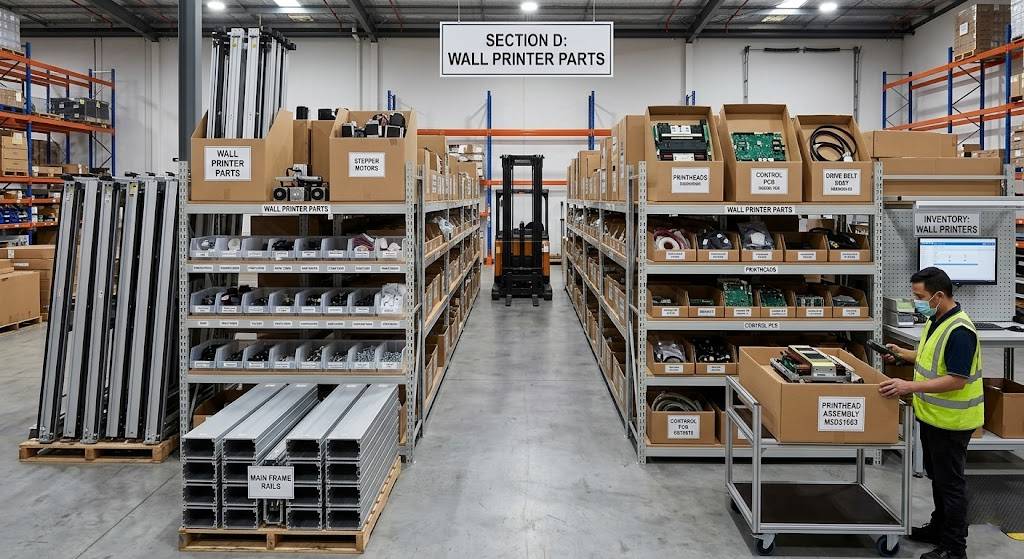
Knowing what to stock is half the system. The other half is knowing where to buy it and when to pull the trigger — before you're staring at a stopped machine.
Four supplier channels serve wall printer operators. Each has a different role. Pick the wrong channel for the wrong part and you end up with a 30-day wait on something that should have been on your shelf already.
The Four Channels and What They're For
Wall Printing OEM Factory Direct covers anything custom, firmware-dependent, or impossible to substitute: motherboards, motion controllers, proprietary printheads. Lead times run 7–30 days by air freight once your specs are confirmed — longer for new part qualification. MOQs run high at 50–200 units for electronics. This channel rewards planning. It is not built for panic buying. Cost starts at 1.0x ex-works. Add 10–20% for freight, duties, and brokerage to get your true landed cost.
Authorized Regional Distributors carry OEM-branded parts — PSUs, drives, standard motors, sensors — with full warranty and local RMA support. Stocked catalog items ship in 3–7 days. Non-stocked items fall back to factory lead times of 15–45 days. You'll pay 1.5x–1.8x OEM list price for that warranty and availability. For Tier A and Tier B parts where part origin matters, it's worth it.
Industrial B2B Platforms (Alibaba, Digi-Key, RS Components) work best for standardized, spec-matchable parts: NEMA-frame stepper motors, switching PSUs, cables, fans, bearings. Cross-border express takes 5–14 days. Regional stock can reach your door in 1–3 days. Cost lands at 0.8x–1.3x OEM depending on brand. One hard rule: check pinout, voltage, and connector compatibility against your original BOM. A listing that says "compatible" does not mean drop-in safe.
Local Electronics and Mechanical Suppliers serve one purpose — speed. Generic fittings, PTFE tubes, O-rings, suction filters, cables: 2–5 days in-country. This is your emergency backup layer for consumable Tier A items. Skip this channel for anything that needs firmware matching or tight precision tolerancing.
Supplier Channel Comparison Matrix
Channel | Best For | MOQ | Lead Time | Cost vs. OEM | Warranty |
|---|---|---|---|---|---|
OEM Factory Direct | Motherboards, custom printheads, motion controllers, firmware-locked parts | 50–200 pcs (electronics) | 7–30 days air; 30–60 days sea | 1.0x + 10–20% landed | Full OEM + engineering support |
Authorized Distributor | OEM-branded PSUs, drives, motors, sensors | 1–10 pcs | 3–7 days (stocked); 15–45 days (backorder) | 1.5x–1.8x | Full OEM warranty + local RMA |
B2B Platforms | Standard motors, PSUs, cables, fans, generic hardware | 1 pc (catalog) | 5–14 days cross-border; 1–3 days local | 0.8x–1.3x | ~1 year, platform-level protection |
Local Suppliers | Fittings, PTFE tubes, O-rings, filters, fasteners, basic sensors | 1–5 pcs | 1–2 days same-city; 2–5 days in-country | 1.2x–1.6x | Limited; DOA + short-term swap |
Procurement Cadence by Tier
Channel selection and order timing work together. Each tier runs on its own cycle.
Tier A — Order Every 90 Days
Parts: dampers, ink tubes, capping pads, O-rings, filters. Source from local suppliers and B2B platforms. Place bulk POs sized to 90 days of projected consumption × 1.5 for any item with cross-border lead times. Set your reorder point at 60 days of stock on hand. Never let coverage drop below 30 days before the next shipment lands.
Tier B — Order Every 180 Days
Parts: timing belts, linear sliders, UV lamp modules, vacuum pumps. Source through B2B platforms and distributors. For any part with a lead time over 21 days, set your purchase order at 150% of your 6-month forecast. Schedule inbound deliveries 4–6 weeks before planned preventive maintenance windows — not after you've already pulled the belt off the machine.
Tier C — Order Once Per Year
motherboards, servo drives, PSUs, controller boards used in a vertical wall printer. Use OEM direct or an authorized distributor—firmware version control is non-negotiable. Buy one pre-configured cold spare set per machine model. Stress-test every PSU for 48–72 hours at 80% load on arrival. A Tier C spare that has never been tested gives you false confidence, not real protection.
The 21-Day Buffer Rule
Some parts have a total lead time — order approval, manufacturing, and shipping combined — that exceeds 21 days. Those parts need a standing safety stock. Use this formula:
Safety Stock = 1.5 × Demand over Lead Time
Your distributor stocks the part locally? Treat lead time as under 7 days and run leaner. They're pulling from factory backorder? Use the full lead time in the formula. For OEM-direct items on critical assemblies — like a wall printer carriage assembly or custom printhead — with 45–60 day lead times, push the multiplier to 2.0x.
Track each part's status with a simple RAG signal:
- Red = less than 1.0x lead-time consumption on hand
- Amber = 1.0–1.5x
- Green = 1.5x or above, with next PO already released
A part hits Amber? The PO goes out the same day. No exceptions. No waiting to see if it holds.
Inventory Management SOP: Threshold Alerts & Cycle Audit Protocol
Parts don't disappear overnight. They deplete one job at a time, until you reach for something and the shelf is empty. Operators who catch that moment early aren't more experienced — they have a system doing the watching for them.
This SOP builds that system. It runs on three layers: a formula-driven reorder trigger, a structured audit rhythm, and a fast-swap protocol that gets your machine back online in 30 minutes or less.
The Reorder Trigger Formula
Gut-feel restocking is how you end up with six capping pads and zero encoder strips. Replace it with a per-SKU calculation:
Reorder Trigger Point = (Average Daily Consumption × Maximum Supplier Lead Time) × Safety Buffer
Safety buffer by tier:
- Tier A: 1.15 (15% — high failure rate, no backup)
- Tier B: 1.10
- Tier C: 1.05 (slow movers; cost-heavy to overstock)
The alert fires when your Effective Available Quantity — on-hand minus units already allocated to booked jobs — drops to or below that threshold. Not when the shelf looks thin. When the number crosses the line.
To make this work, you need clean data on four fields per SKU:
Rolling 90-day average daily consumption (recalculate each month)
95th-percentile supplier lead time pulled from your last six purchase orders — not the distributor's published estimate, your actual confirmed receipt history
On-hand quantity updated after every issue and every receipt
Allocated quantity reserved for jobs already scheduled
The gap between those last two is your real available stock. That's the number the alert watches.
Digital Tracking: What Your Inventory Template Needs to Capture
A spreadsheet works fine built to the right schema. An ERP works better at scale. Either way, every SKU record should carry these fields:
Field | What It Does |
|---|---|
Part SKU | Unique ID per component (e.g., |
Physical Qty / Allocated / Available | Three-way split; Available drives all alert logic |
Warning Threshold Alert | System-calculated reorder point; status auto-updates to |
Last Audit Timestamp | Date, type (Visual / Cycle Count / Full Count), and auditor ID |
Batch/Lot Expiry | Mandatory for all UV inks, solvents, damper seals, flush solutions |
Assigned Machine Serial # | Maps each spare to its primary host; floating pool spares use |
Supplier PO Reference | Links to warranty clock and replenishment history |
RMA Status | Tracks failed parts through |
Two extra fields most operators skip — and shouldn't:
Environmental Class:
UV/Light Sensitive/ESD Sensitive/Mechanical Stress Sensitive/Standard— this decides where the part lives in storage, not just which shelf it sits onCount Variance %: calculated as
|Counted − System| ÷ System × 100; investigate anything above 2–5% or above a preset dollar threshold
The Three-Layer Audit Rhythm
Reorder triggers fire correctly only if your on-hand quantities are accurate. That means auditing on a fixed schedule — not whenever someone gets around to it.
Weekly: Micro-Risk Visual Audit
Scope is narrow: ink path seals, tubing, fittings, pump housings, and carriage umbilicals on every operational machine. The technician walks each printer, scans the location QR code to open the check form, and looks for three things:
- Micro-leak evidence — staining or tacky residue near joints
- Discoloration or brittleness on solvent lines and O-rings
- Clamp integrity with no kinks or metal contact
Any problem gets the affected SKU flagged as "At Risk" and entered into the maintenance queue immediately. Small issues identified early on a commercial wall printer are significantly less expensive to fix than unexpected production stoppages.AT RISK. A maintenance task is created right away. A replacement kit is pre-allocated from stock. If that allocation drops available quantity below the reorder trigger, the system escalates to an expedite notice — before the part is pulled, not after.
Log every inspection: timestamp, machine serial number, inspector ID. Over time, this builds your failure-pattern database.
Monthly: Functional Calibration Audit
Cover all Tier A and B parts across every production unit. Two checks matter most:
Encoder zero-point verification: Run the homing sequence. Compare the encoder index position against baseline spec (±0.1 mm). Any reading outside that band gets a
Calibration Requiredflag. Pre-allocate a spare encoder or carriage module from inventory.Belt tension gauge reading: Measure against OEM spec (example: 38–42 N for common X-axis configurations). Permanent elongation on the gauge means schedule a replacement kit allocation now — not at the next planned service.
Scan every replaced component out of inventory with the machine serial number attached. Run a test print — nozzle pattern, alignment check, color density strip — and log PASS or FAIL. Failures escalate. Passes close the work order.
Quarterly: Full Physical Count with FIFO Enforcement
Every bin. 100%. This is the audit that catches what the weekly visual misses.
The protocol:
1. Freeze or zone-isolate inventory transactions during the count
2. Run count sheets by location — no on-screen quantities visible to counters
3. First counter records; second counter spot-checks all Tier A and a random sample of Tier B
4. Calculate variance percentages; investigate anything above 2–5% or your pre-set dollar threshold
5. Classify root causes: Shrink / Mis-pick / Data Entry / Location Error / Unrecorded Scrap / Unposted RMA
6. Enforce FIFO rotation by hand — for UV and solvent consumables, the earliest-expiry lot goes to the front of the pick face, every time, no exceptions
Post all adjustments with reason codes and two-person approval (Operations + Finance). This closes the loop on variance patterns and keeps your reorder formula tied to reality.
Alert → Swap → Replenish: The 30-Minute Fault Recovery Flow
A machine throws a fault — ink starvation, encoder error, carriage ESD event. The response path should be automatic, not improvised.
Step 1 — Fault triage: The operator opens the SOP checklist mapped to that specific error code. Step-by-step yes/no logic rules out software issues, job-file errors, and user errors first. The checklist points to the part group and its tier.
Step 2 — Rapid swap: The operator scans the bin label for the Tier A or B replacement module. The system confirms: right SKU, compatible machine series, correct firmware version. Target time is 30 minutes for predefined swap modules — ink path cassette, encoder strip, carriage PCB, belt tension unit. Run a test print on completion. Log PASS or FAIL.
Step 3 — Inventory update and replenishment trigger: Scan the failed part out of the machine. Tag it with failure category, machine serial number, and run-hours. RMA-eligible parts move to Pending RMA status, linked to the original supplier PO. The system deducts one unit from available stock. Available quantity falls below the warning threshold? A draft PO auto-generates — suggested quantity set to max(EOQ, 2× lead-time demand).
Step 4 — Weekly ops review: Compare fault alarm logs against actual parts swaps. The same SKU swapping more often than your tier classification assumed? Revise the minimum level upward. That's how the system self-corrects over time.
Storage Conditions That Protect What You've Stocked
An accurate reorder trigger and a solid audit rhythm won't help if parts degrade before you open the package. Environmental controls are not optional for wall printer spare components — they're part of the SOP.
Four zones, non-negotiable:
ZONE-UV-CLIM— Climate-controlled, UV-blocked storage for inks, dampers, ink tube coils, and elastomer seals. Target: 18–22°C, under 60% relative humidity. Use data-logging hygrometers and set alarms for any out-of-range condition lasting more than two consecutive hours.ZONE-ESD— Anti-static shielding bags or trays for all PCBs, encoder strips, and carriage electronics. Line bins with ESD mats, use grounded racks, and keepESD ZONElabels visible. Staff handling Tier A electronics must wear wrist straps. Run compliance checks on a random schedule — not a set one.ZONE-MECH— Hang timing belts on large-radius hooks to prevent permanent set. Store rails and linear guides upright on solid shelves. Don't stack anything heavy on encoded rails or carriage assemblies. Check each quarter for flat spots, deformation, and corrosion. Recurring scrap on the same part means raising your minimum stock level — not just ordering more.ZONE-CHEM— Store solvents and primers in sealed, labeled containers per local hazmat rules. Keep them away from electronics at all times.
Any damper and ink tube spare parts or UV wall printer lamp replacement modules stored in the wrong zone age faster than your replacement cycle assumes. Stocking the right quantity works only if the shelf life assumptions behind those quantities hold.
The full system — trigger formula, tracking schema, three-layer audit, swap protocol, storage zones — turns a parts shelf into a downtime-prevention engine. Each piece depends on the others. The formula needs accurate counts. The counts need a structured audit. The audit needs a consistent storage environment. Run all five layers together and unplanned stops become the exception, not the standard.
Rapid Field Replacement Protocols for Critical Failures
Speed is the one metric that matters when a machine goes down mid-job. Not thoroughness. Not elegance. Speed — run in the right sequence, without skipping the steps that cause problems later.
What follows is a field-tested protocol for the five failure modes that stop wall printers dead. Each one has a defined target: get back to first print in under 90 minutes. That's not a goal. It's the standard that separates operators who absorb a bad morning from those who absorb a lost week.
Printhead Swap: Target ≤ 90 Minutes
Park the carriage in the service position. Cut main AC power, then disable DC power to the carriage. Wrist strap on, chassis grounded — ESD damage on a fresh printhead is an expensive rookie mistake.
Isolate ink before you touch anything:
- Close all main ink valves or clamp tubes with non-crushing line clamps
- Open the negative-pressure tank vent for 30–60 seconds to equalize
- Run the service menu depressurization routine if your firmware supports it. Target residual pressure below 0.5 kPa at the carriage test port
Removing the head:
- Open the quick-lock clamp rear-to-front — not front-to-rear. This stops the clamp edge from dragging across the nozzle plate
- Disconnect the flex cable by supporting the strain-relief tab, not the foil. Note the Pin 1 marker before you pull
Installing the replacement:
- Align Pin 1 to Pin 1. Seat until the latch clicks. Keep the bend radius at the cable exit under 10°
- Insert the head straight down at 0° — no rocking — until you feel the hard stop
- Lock the clamp. Check for lateral play with a fingertip wiggle (tolerance: ≤ 0.1 mm)
Prime and verify:
- Run 3–5 long clean cycles or draw 3–10 ml per color channel through the cap station
- Replace the capping station vacuum gasket. Clean the tray, install a new gasket, and confirm cap height within ±0.1 mm of OEM spec
- Vacuum test: hold –3 to –5 kPa at the cap line for 10–20 seconds. Pressure decay over 0.5 kPa means redo the seal
- Print a 200% coverage test pattern: solid CMYK bars, composite black overlap, fine nozzle check. Missing nozzles above 0.1% per channel means another prime cycle — not production
Ink Leak Containment and Damper Splice: Target ≤ 60 Minutes
Hit E-stop now on the affected wall printer. Place chemical-resistant absorbent pads under the leak zone and block drainage paths. Running solvent inks in a wall printing machine? Push ignition sources 3 meters clear and boost ventilation before anything else.
Depressurize the system:
- Confirm pumps are off
- Open the negative-pressure tank vent until the gauge reads 0 kPa
- Raise the line loop above tank level if you see active siphoning from the main tanks
Splice the damaged segment:
- Mark cut points at least 20–30 mm beyond visible damage
- Cut the tube square with a tube cutter — bevel angle under 5°
- Install a push-fit connector rated for your ink chemistry (PTFE or PFA body, Viton/FKM or EPDM seals)
- For threaded segments: 2–3 wraps of PTFE tape in the tightening direction. Leave the first 1–2 threads bare to keep tape out of the ink path
Swap the damper if affected:
- Clamp the upstream line first
- Install the replacement damper with the flow direction correct — the arrow or larger chamber faces the head side
- Release clamps last to prevent shock flow
Return to service check:
- Target stable negative pressure of –1.2 kPa, held for 60 seconds with drift under 0.1 kPa
- Flush ~2 ml cleaning fluid per channel. Output should run uniform color with zero bubbles
- Wipe all joints dry. Run 5–10 minutes in low-duty mode. Any wetness at a fitting means redo that connection
- The first job back should be a non-critical test batch, not a client deliverable
Belt and Encoder Strip Service: Target ≤ 60 Minutes
Cut power and lock the carriage in place before touching the belt. A free-sliding carriage during a belt swap has hurt people.
Belt replacement:
- Release the motor tensioner pulley locking bolts
- Route the new belt with teeth fully engaged on both pulleys — no 180° twists, minimum 120° wrap on the drive pulley
- Check tension at mid-span with a belt tension gauge. Target 1.5 kgf for medium-gantry systems (acceptable range: 1.2–1.8 kgf)
- Recheck tension after 5 carriage strokes. Tension settles after the first few movements
Encoder strip cleaning and swap:
- No fingerprints on the strip edges — ever
- Clean with a lint-free microfiber cloth dampened with 99% isopropyl alcohol: one pass, then one dry pass
- Replace the strip if you see nicks or cloudiness crossing the encoder field. Cleaning a damaged strip wastes time
- Set the sensor air gap at 0.3 mm using a feeler gauge. Center the strip in the sensor optical window with lateral offset under 0.1–0.2 mm
Verify motion before printing:
- Run a full axis homing cycle on all motion axes
- Run a high-speed travel test at normal print speed plus 20%
- Run a bidirectional straight-line test pattern. Look for zero positional jitter and no encoder loss error codes
Stepper Motor and Driver Replacement: Target ≤ 45 Minutes
Photograph the original phase wiring — A+/A-/B+/B- — at both the motor connector and the driver terminal before you disconnect anything. That photo has saved operators an hour of troubleshooting more times than anyone admits.
Swap steps:
- Disconnect the harness and tag each pair if colors are non-standard
- Remove mounting screws. Keep washers and spacers in orientation order
- Match the replacement to the original frame size (NEMA 17 or 23), shaft length, and coupling type
- Keep parallel alignment. Don't bottom the shaft in the coupling
Driver configuration:
- Check the original driver DIP switch settings: microstepping (1/8, 1/16) and current limit
- Copy those settings on the replacement driver — match them exactly
- The replacement motor has a different current rating? Set the driver to 80–90% of rated phase current. Running hotter than that shortens the driver's life faster than you'd expect
Verification:
- Jog the axis in 50 mm increments each direction in service mode before loading any print job
- Motor temperature should stay under 60–70°C in the first 5–10 minutes of jog testing
- Reset the software home coordinate for that axis
- Run one full-length stroke with hard acceleration and deceleration to confirm torque headroom
Motherboard Bypass and Controller Swap: Target ≤ 2–3 Hours to First Print
A controller board failure looks catastrophic. It's not — so long as you have the right spare and follow the isolation sequence.
Before removing the failed board:
- Transfer the SD card or firmware cartridge to the replacement board. This keeps machine configuration intact and avoids a full firmware reflash
- Copy MAC address jumper shunts and ID jumpers to maintain licensing and network identity
Minimal-wiring power-up first:
Connect four things only: main DC power, stepper/servo main connectors, USB or Ethernet to a service laptop, and nothing else. No sensors, no heaters, no fans, no auxiliary outputs.
Apply power and confirm:
- Serial handshake established (COM port detected, motion controller online)
- Firmware boots without fatal errors
Progressive I/O reconnection:
Add secondary modules one at a time — endstops, temperature sensors, heaters, fans — and power cycle after each addition. A reset or overcurrent event after connecting module X? That module or its harness is the fault. Tag it and move on.
Reduced-capability mode:
Once the minimal set is stable, disable non-critical subsystems in firmware — unused heads, auxiliary axes. Resume printing in reduced-capability mode. Lower speed, fewer heads, but the machine is generating revenue again while the full diagnosis continues.
Field MTTR Targets at a Glance
Failure Type | Target Recovery Time |
|---|---|
Printhead and capping unit swap | ≤ 60–90 min |
Ink leak containment and splice | ≤ 45–60 min to safe-run |
Belt and encoder strip service | ≤ 60 min |
Stepper motor and driver swap | ≤ 45 min |
Motherboard bypass to first print | ≤ 2–3 hours |
These targets assume one thing: the spare is on the shelf, pre-configured, and tested. Every protocol above falls apart without that in place. The parts list from earlier sections isn't inventory management — it's what makes these time targets reachable. One requires the other. Neither works alone.
Log pressure readings, tension values, and air gap measurements after every swap. The next technician — or you at 11 PM on a Friday — will complete the wall printer repair in 30 minutes instead of two hours because someone wrote the numbers down.
Conclusion

Every hour your wall printer sits idle is an invoice you'll never send.
The most profitable wall printing businesses aren't run by operators with the fastest machines or the lowest ink costs. They're run by people who treat spare parts inventory as revenue insurance — not overhead. A $600 investment in a staged A/B/C parts kit feels easy to skip — until a blown printhead or snapped encoder strip shuts down a three-day commercial project. At that point, the math hits hard and fast.
You've got the ROI model, the tiered parts list, and the inventory SOP. Now act on them. Spend 90 minutes this week pulling everything off your shelf and checking it against the A-tier list. Find at least one verified supplier for printhead replacement and wall printer belt components before you're scrambling for them mid-job.
Set the threshold alerts. Run the quarterly audit. Stock ahead of failure — not after it.
That's the whole system. Now go build it.
Want to reduce wall printer downtime and improve long-term profitability? Contact WallPrintBox for expert advice on wall printer maintenance, spare-parts planning, and production uptime optimization.